

RegoHeatPump Binding
The Rego heat pump binding supports:
- Rego 6xx controllers family and
- Husdata interface.
The Rego 6xx family
The Rego 6xx controllers family is used in many heat pumps such as IVT/Bosch/Autotherm/Carrier and others.
The Rego 6xx unit contains an interface marked as service. Header of this interface is close to the control unit. This is a 5V (TTL) serial interface and is connected by a 9-pin CAN/D-sub connector. Pinout:
2 - RxD 3 - TxD 4 - +5V 5 - GND
Serial communication is using 19200 bps, 8 bit, no parity, 1 stop bit.
Thing configuration
Two connection types are supported:
- TCP/IP and
- serial (RS232).
TCP/IP connection
A transparent bridge between the serial interface of the heat pump and network (i.e. Wi-Fi) is used. This way no additional wires are required between heat pump and computer, running openHAB.
There are many existing projects providing such functionality, such as Serial to Network Proxy (ser2net).
For my setup, I used a low-budget (~5€) circuit, that is integrated into the heat pump and connects to a Wi-Fi using an ESP8266-based module.
Board:
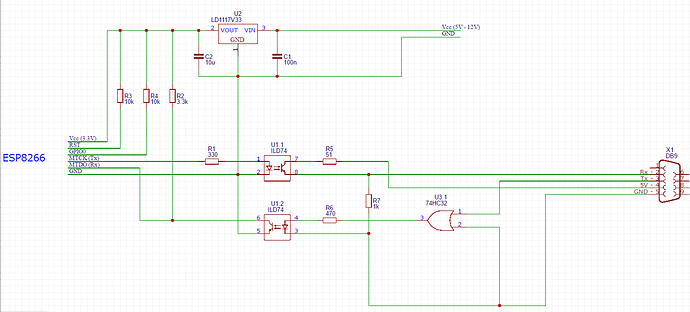
The code running on the ESP module can be found in the esp8266-bridge repository on GitHub. There are other projects providing ESP firmware with similar functionality, such as the ESP-LINK WiFi-Serial Bridge project on GitHub, but did not test with those.
Configuration of the TCP/IP Thing:
- address: the hostname/IP address of the transparent bridge on the local network - mandatory,
- tcpPort: the port number to use to connect to the transparent bridge - optional, defaults to 9265,
- refreshInterval: refresh interval in seconds, used to fetch new values from the heat pump - optional, defaults to 60 seconds.
Example Thing definition:
regoheatpump:ipRego6xx:ivtIP [ address="192.168.2.50", tcpPort="9265" ]Serial connection
In order to connect directly to the Rego 6xx controller, one needs to adjust the TTL levels coming from the Rego unit to levels used by an RS232 serial port, used within computers, using MAX232 or similar.
Parameters:
- portName: the name of the serial port on your computer - mandatory,
- refreshInterval: refresh interval in seconds, used to fetch new values from the heat pump - optional, defaults to 60 seconds.
Example Thing definition:
regoheatpump:serialRego6xx:ivtSerial [ portName="COM3" ]Channels
Below is the list of supported channels:
| Channel Type ID | Item Type | Access |
|---|---|---|
| sensorValues#radiatorReturn | Temperature | R |
| sensorValues#outdoor | Temperature | R |
| sensorValues#hotWater | Temperature | R |
| sensors#radiatorForward | Temperature | R |
| sensorValues#indoor | Temperature | R |
| sensorValues#compressor | Temperature | R |
| sensorValues#heatFluidOut | Temperature | R |
| sensorValues#heatFluidIn | Temperature | R |
| sensorValues#coldFluidIn | Temperature | R |
| sensorValues#coldFluidOut | Temperature | R |
| sensorValues#externalHotWater | Temperature | R |
| status#lastErrorTimestamp | DateTime | R |
| status#lastErrorType | String | R |
| frontPanel#powerLamp | Switch | R |
| frontPanel#heatPumpLamp | Switch | R |
| frontPanel#additionalHeatLamp | Switch | R |
| frontPanel#hotWaterLamp | Switch | R |
| frontPanel#alarmLamp | Switch | R |
| controlData#radiatorReturnTarget | Temperature | R |
| controlData#radiatorReturnOn | Temperature | R |
| controlData#radiatorReturnOff | Temperature | R |
| controlData#hotWaterOn | Temperature | R |
| controlData#hotWaterOff | Temperature | R |
| controlData#radiatorForwardTarget | Temperature | R |
| controlData#addHeatPower | Number (%) | R |
| deviceValues#coldFluidPump | Switch | R |
| deviceValues#compressor | Switch | R |
| deviceValues#additionalHeat3kW | Switch | R |
| deviceValues#additionalHeat6kW | Switch | R |
| deviceValues#radiatorPump | Switch | R |
| deviceValues#heatFluidPump | Switch | R |
| deviceValues#switchValue | Switch | R |
| deviceValues#alarm | Switch | R |
| settings#hotWaterTarget | Temperature | RW |
| settings#hotWaterTargetHysteresis | Temperature | RW |
| settings#heatCurve | Number | RW |
| settings#heatCurveFineAdj | Temperature | RW |
| settings#heatCurve2 | Number | RW |
| settings#heatCurve2FineAdj | Temperature | RW |
| settings#indoorTempSetting | Temperature | RW |
| settings#curveInflByInTemp | Number | RW |
| settings#adjCurveAt20 | Temperature | RW |
| settings#adjCurveAt15 | Temperature | RW |
| settings#adjCurveAt10 | Temperature | RW |
| settings#adjCurveAt5 | Temperature | RW |
| settings#adjCurveAt0 | Temperature | RW |
| settings#adjCurveAtMinus5 | Temperature | RW |
| settings#adjCurveAtMinus10 | Temperature | RW |
| settings#adjCurveAtMinus15 | Temperature | RW |
| settings#adjCurveAtMinus20 | Temperature | RW |
| settings#adjCurveAtMinus25 | Temperature | RW |
| settings#adjCurveAtMinus30 | Temperature | RW |
| settings#adjCurveAtMinus35 | Temperature | RW |
| settings#heatCurveCouplingDiff | Temperature | RW |
| settings#summerDisconnection | Temperature | RW |
| operatingTimes#heatPumpInOperationRAD | Hours | R |
| operatingTimes#heatPumpInOperationDHW | Hours | R |
| operatingTimes#addHeatInOperationRAD | Hours | R |
| operatingTimes#addHeatInOperationDHW | Hours | R |
Access: R = read only; RW = read write
Note - breaking change: To have all writable channels within the settings group, the hotWaterTarget channel was moved from controlData to the settings group.
The Husdata interface
The Husdata Interface bridges the often complex communication methods with a heat pump controller and provides access through a simple standard interface over RS-232.
Supported heat pump models
| Heat pump models | Technical |
|---|---|
| IVT Greenline / Optima 900 | Rego 600 Serial |
| IVT 490 | Rego 400 Serial |
| IVT Premiumline X, Optima/290-AW | Rego 800, Can bus |
| IVT Greenline HE/HC/HA+Prem HQ/EQ | Rego 1000, Can bus |
| NIBE xx45 | EB100, RS-485 |
| NIBE Fighter series | Styr 2002, RS-485 |
| Thermia Diplomat series | 901510, i2c |
Above list is informational, please consult with the Husdata interface provider for further details.
Thing configuration
Two connection types are supported:
- TCP/IP and
- serial (RS232).
TCP/IP connection
A transparent bridge between the Husdata interface and network (i.e. Wi-Fi) is used.
There are many existing projects providing such functionality, such as Serial to Network Proxy (ser2net).
Configuration of the TCP/IP Thing:
- address: the hostname/IP address of the transparent bridge on the local network - mandatory,
- tcpPort: the port number to use to connect to the transparent bridge - optional, defaults to 9265.
Example Thing definition:
regoheatpump:ipHusdata:ivtIP [ address="192.168.2.50", tcpPort="9265" ]Serial connection
One can connect the Husdata interface directly to a computer that runs openHAB.
Parameters:
- portName: the name of the serial port on your computer - mandatory.
Example Thing definition:
regoheatpump:serialHusdata:ivtSerial [ portName="COM3" ]Channels
Below is the list of supported channels, all values are read only:
| H1 ID | Name | Channel Type ID | Item Type |
|---|---|---|---|
| 001 | Radiator Return | sensorValues#radiatorReturn | Temperature |
| 002 | Radiator Forward | sensorValues#radiatorForward | Temperature |
| 003 | Heat carrier Return | sensorValues#heatFluidIn | Temperature |
| 004 | Heat carrier Forward | sensorValues#heatFluidOut | Temperature |
| 005 | Brine In / Evaporator | sensorValues#coldFluidIn | Temperature |
| 006 | Brine Out / Condenser | sensorValues#coldFluidOut | Temperature |
| 007 | Outdoor | sensorValues#outdoor | Temperature |
| 008 | Indoor | sensorValues#indoor | Temperature |
| 009 | Hot water 1 / Top | sensorValues#hotWater | Temperature |
| 00A | Hot water 2 / Mid | sensorValues#externalHotWater | Temperature |
| 00B | Hot gas / Compressor | sensorValues#compressor | Temperature |
| 00E | Air intake | sensorValues#airIntake | Temperature |
| 011 | Pool | sensorValues#pool | Temperature |
| 104 | Add heat status | controlData#addHeatPowerPercent | Number - % |
| 104 | Add heat status | controlData#addHeatPowerEnergy | Number - kW |
| 107 | Heating setpoint | controlData#radiatorReturnTarget | Temperature |
| 108 | Compressor speed | controlData#compressorSpeed | Number - % |
| 203 | Room temp setpoint | settings#indoorTempSetting | Temperature |
| 204 | Room sensor influence | settings#curveInflByInTemp | Number |
| 205 | Heat set 1, CurveL | settings#heatCurve | Number |
| 206 | Heat set 2, CurveR | settings#heatCurve2 | Number |
| A01 | Compressor | deviceValues#compressor | Switch |
| A04 | Pump Cold circuit | deviceValues#coldFluidPump | Switch |
| A05 | Pump Heat circuit | deviceValues#heatFluidPump | Switch |
| A06 | Pump Radiator | deviceValues#radiatorPump | Switch |
| A07 | Switch valve 1 | deviceValues#switchValve | Switch |
| A08 | Switch valve 2 | deviceValues#switchValve2 | Switch |
| A09 | Fan | deviceValues#fan | Switch |
| A0A | High Pressostat | deviceValues#highPressostat | Switch |
| A0B | Low Pressostat | deviceValues#lowPressostat | Switch |
| A0C | Heating cable | deviceValues#heatingCable | Switch |
| A0D | Crank case heater | deviceValues#crankCaseHeater | Switch |
| A20 | Alarm | deviceValues#alarm | Switch |
| FF1 | EL-Meter 1 | deviceValues#elMeter1 | Number - pulses |
| FF2 | EL-Meter 2 | deviceValues#elMeter2 | Number - pulses |