
openHAB 5.2 Release
Can you believe it's already been a year since the major release of openHAB 5.0? We are thrilled to introduce openHAB 5.2, packed with exciting new features, plenty of bug fixes, and amazing new AI features!
But that's not all! Following the release of openHAB 5.1 last winter, which brought many "under the hood" changes, this release focuses on more user-facing changes.
This release includes only a small number of breaking changes, so upgrading from openHAB 5.1 should be really smooth. Please review our official release notes (opens new window) to learn about all breaking changes, new add-ons, enhancements, and fixes.
With that being said, we again want to share some statistics that show the progress in numbers and highlight some of the new features that you should not miss.
# Activity
Every new feature in openHAB 5.2 is a testament to the dedication of our vibrant, global community. Activity across our GitHub repositories has been non-stop over these past few months. Altogether, 141 contributors poured their efforts into a whopping 3,082 commits across our GitHub repositories (opens new window).
This big release includes impactful work across every part of the ecosystem:
- Core (opens new window): 323 pull requests, including 110 enhancements and 58 bug fixes — adding 44,791 lines of new code.
- Add-ons (opens new window): 798 pull requests, including 223 enhancements and 233 bug fixes, resulting in 554,128 lines of new code.
- UIs (opens new window): 467 pull requests, including 108 enhancements and 175 bug fixes, totaling 37,915 lines of new code.
Countless other repositories (opens new window) — from documentation and automation helper libraries to our mobile apps — also received a steady stream of contributions too extensive to list individually.
A massive thank you to everyone driving openHAB forward!
We also want to take a moment to shine a spotlight on our top code contributors for this release, recognized for landing the most commits or making incredibly large contributions in their respective repositories:
- Holger Friedrich (@holgerfriedrich (opens new window)) for openHAB Core & Add-ons
- Laurent Garnier (@lolodomo (opens new window)) for openHAB Core
- Mark Herwege (@mherwege (opens new window)) for openHAB Core
- Ravi Nadahar (@Nadahar (opens new window)) for openHAB Core
- Leo Siepel (@lsiepel (opens new window)) for openHAB Add-ons
- Jacob Laursen (@jlaur (opens new window)) for openHAB Add-ons
- Florian Hotze (@florian-h05 (opens new window)) for the openHAB Main UI & openHAB Core
- Jeff James (@jsjames (opens new window)) for the openHAB Main UI
Beyond coding, many of these individuals pull double duty as maintainers — evaluating pull requests, shaping architectural decisions, and mentoring newcomers. As of this release, our team includes 43 active maintainers across the project.
Whether you are squashing bugs, polishing the UI, refining documentation, or architecting entirely new integrations — every single contribution counts.
# Highlights
As you might have already noticed in the activity statistics, there has been a lot of development on openHAB — too much to list it all. Please refer to the release notes (opens new window) to check out what's new and noteworthy (e.g., breaking changes).
In the following sections, our maintainers and contributors introduce a selection of new features you will not want to miss.
# Chat with openHAB
Florian Hotze (@florian-h05 (opens new window)), openHAB Maintainer
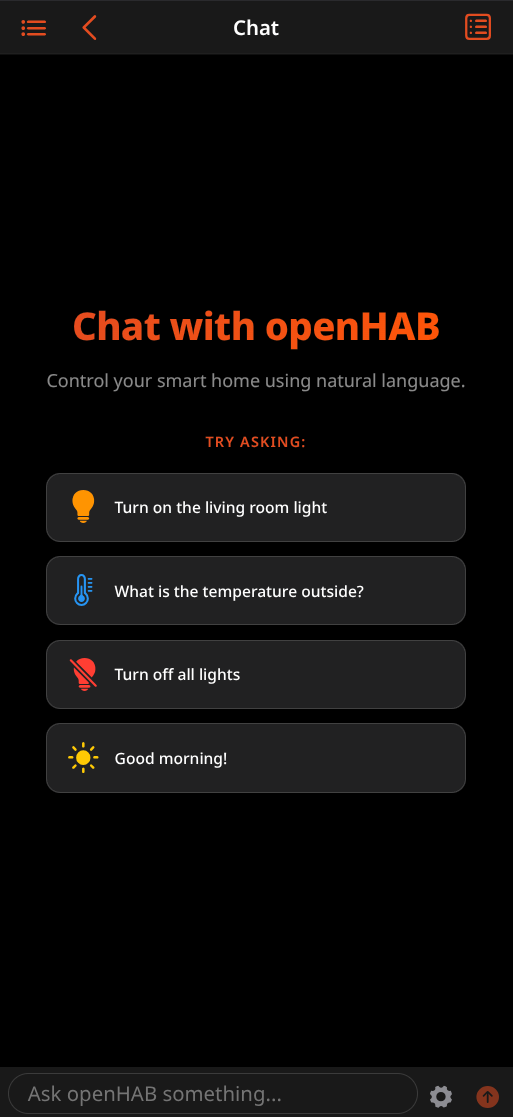
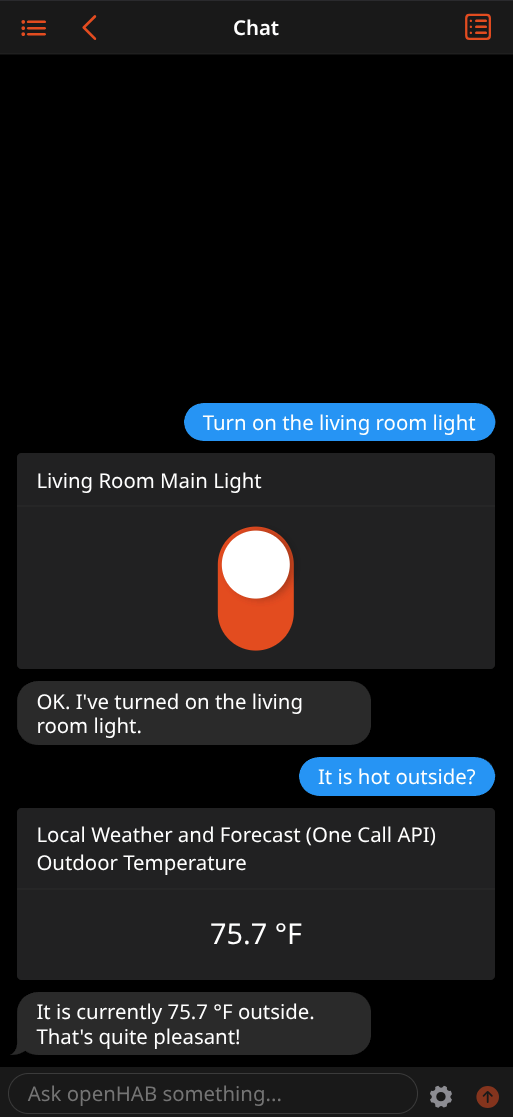
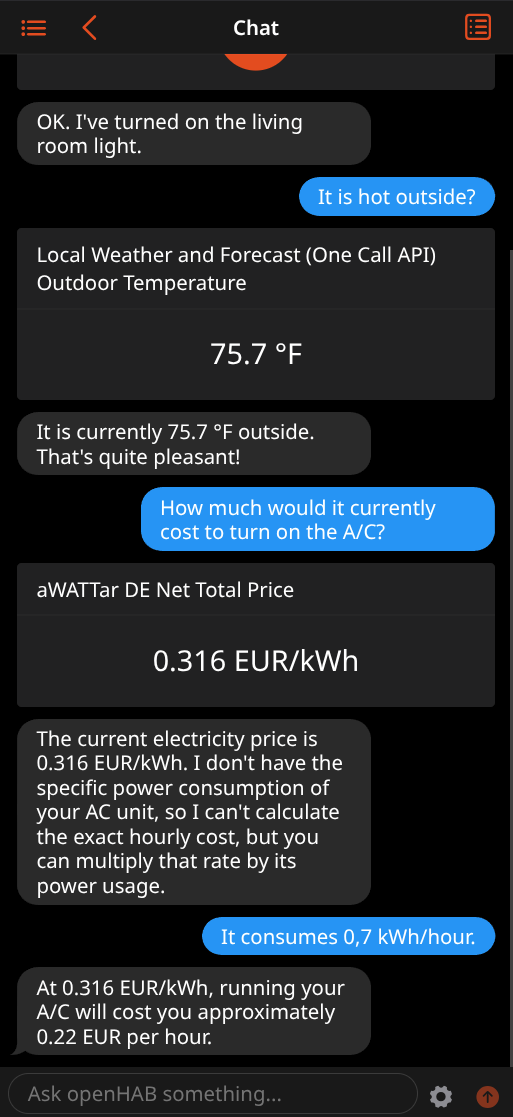
A major highlight of the openHAB 5.2 release is the introduction of a new Chat interface in Main UI along with support for LLM-based human language interpreters. This feature takes natural language interaction with your smart home to a whole new level, allowing you to have a conversation with your openHAB instance with back-and-forth exchanges and responses.
# A Smart Home That Truly Understands You
Instead of relying on rigid, predefined sentence matching rules, this new feature allows leveraging the power of Large Language Models (LLMs) to understand and respond to natural language in nearly any language. By pairing openHAB with AI services like Google Gemini, OpenAI, or Ollama, you can type (or say) instructions just like you are messaging a friend. Whether you ask "Can you make the living room cozy?" or "Are any windows left open downstairs?", the LLM interprets your intent, queries the state of your home, and acts accordingly.
What makes the Chat interface so powerful is its deep integration into Main UI. When the LLM decides to interact with a device, the UI doesn't just display the response; it dynamically renders the default card widget for that Item right inside the chat feed! This allows you to immediately see the state of your smart plug, dim a light, or adjust a thermostat slider directly inside the conversation thread.
# Powerful Control & Extensibility
The Chat interface and the underlying LLM-based human language interpretation framework are built to give you full control over how the AI interacts with your server:
- LLM Tooling Framework:
openHAB equips the LLM with built-in tools like retrieving the current date & time, checking device states, or issuing commands. - Persistent Conversations:
To support multi-turn, back-and-forth conversations, openHAB retains conversation history, allowing you to continue where you left off. - Customization:
For every interaction, you can select which LLM tools to enable. You can also customize the LLM's behavior by modifying the system prompt to give it its own unique "personality." - LLM Provider Agnostic:
The Chat interface and the underlying LLM-based human language interpretation framework are built without a specific AI provider in mind. openHAB 5.2 initially only supports Google Gemini, but we will soon extend this to OpenAI and OpenAI-compatible providers like Ollama or OpenRouter, giving you the flexibility to choose the best AI model for your use case.
# Privacy & Security First
Entrusting an AI model with your home doesn't mean giving up control. openHAB 5.2 introduces a robust Item Permission Model designed specifically to protect your privacy and ensure security-critical parts remain safe.
Through the voiceSystem metadata and a system-default setting, you can explicitly define how individual Items are exposed to human language interpreters using three levels: No Access, Read-Only, or Read-Write.
Items can also inherit permissions from their parent groups, with the most restrictive setting winning in case of conflicts.
This makes it incredibly simple to shield security-sensitive devices — like smart locks, garage doors, and alarm systems — from being accessed by the LLM, or restrict them to read-only status.
Additionally, limiting the scope of exposed Items boosts performance, as the LLM has a smaller, more focused context to evaluate.
# Getting Started
Ready to get started? Setting it up is simple:
- Install the new Google Gemini binding from the add-on store.
- Get an API key from the Google AI Studio (opens new window) and create a Gemini account Thing.
- Navigate to System Settings → Voice and configure Gemini as your default human language interpreter.
- You are ready to start chatting!
For more details, refer to the Voice: Human Language Interpreter documentation.
# The openHAB MCP Server
Dan Cunningham (@digitaldan (opens new window)), openHAB Maintainer
The Model Context Protocol (MCP) is a standard way for AI assistants to connect with third-party systems using the concept of tool calling — specially crafted API endpoints that are tailored for agentic use. Our new MCP integration exposes your openHAB instance using a wide range of tools, giving AI agents a powerful way to control, edit, and monitor your home system.
The openHAB MCP server provides these capabilities:
- Query and control your Items using natural language.
- Find the right Items through the openHAB semantic model and fuzzy matching.
- Create rules, both traditional recurring and new one-shot rules.
- Build and edit Main UI pages, custom widgets, floor plans, and more.
- Manage static assets like icons and images.
- Manage Things, read logs, and reach the full REST API for advanced setups.
# Controlling openHAB
The server uses your semantic model and fuzzy matching to find the right rooms, equipment, and points, so a request for the "office lights" works even if the Item is named "office ceiling light". Ask it to dim the bedroom lights to 30 percent and set them to warm white, or set the living room to movie mode and tell you if anything is still on downstairs. You can also ask general questions, such as which doors are unlocked right now or whether the garage is still open, and quickly get an accurate state of your home.
# Creating rules
You can also ask your agent to create traditional recurring rules, like turning on the porch light every day at sunset, or running the sprinklers for twenty minutes on Monday, Wednesday, and Friday mornings. Additionally, the MCP server supports a new one-shot style rule for actions that should only fire once, like alarms or reminders. Say "turn off the patio heater in one hour," or "turn on the outside lights tonight at 7," and the rule will automatically fire once and then delete itself.
# Editing Main UI
With the UI feature enabled, you can build and modify Main UI pages, floor plans, and custom widgets. The MCP server is aware of every widget and all controls Main UI supports, so the assistant always knows the full set of components available and how each one is configured. You can ask it to create a page or floor plan for a room, and it will lay out the design, place your devices on it, and style the page into something modern and beautiful. Pair this with the optional static asset support, and the assistant can create an interactive SVG (such as a floor plan of your house), upload it, and then use the UI tools to wire it into a page or floor plan so the rooms and devices on it become live controls.
# Advanced tools
For more involved setups, the assistant can directly manage your Things and Items, as well as read your logs to help track down a problem. And when you need something that other tools do not cover, it can optionally have access to the full openHAB REST API, which means anything openHAB exposes is available.
# Security and access
Access is built around an openHAB user token, either generated manually through Main UI or using the built-in OAuth connector, which allows a one-click setup option using a web browser for popular clients that support it. Different tools can be enabled or disabled, allowing for granular control over access to sensitive areas like Thing configuration or full API access.
Agents can connect directly to your local instance if their clients support local access (such as Claude Code, Codex, or Antigravity). Other agents that require external access, like Claude, Gemini, and ChatGPT, can use the optional myopenHAB connection option, which is automatically configured through our cloud service when enabled on your local instance.
You can read more about our new MCP binding, including tool use, client setup, and example use cases, on the MCP integration add-on page.
# Core Runtime Enhancements
# YAML Configuration Files for the UI
Jimmy Tanagra (@jimtng (opens new window)), openHAB Maintainer
In this release, file-based YAML support has been introduced for UI pages and custom widgets.
Previously, customized Main UI components were strictly created and managed via Main UI.
With this update, you can now define, organize, and back up your pages and widgets directly inside your $OPENHAB_CONF directory using simple, clean YAML files.
Key details of this new feature include:
- Marketplace Integration:
Custom widgets can be easily adapted from the openHAB Marketplace for your configuration files. With the updated marketplace support, widgets using the new YAML format (which includes top-levelversion:andwidgets:sections) can be copied directly without any changes. For older marketplace widgets (identified by a top-leveluid:key), you will need to add the widget's UID as a map key under your file's top-levelwidgets:section and nest the marketplace configuration underneath it. - Read-Only Safeguards:
Much like file-based Items, Things, and Rules, UI components loaded via configuration files are marked as read-only. Main UI and the REST API treat these as unmanaged entities, displaying a padlock icon and blocking accidental edits to ensure your text files remain the single source of truth. - Broad Page Support:
The YAML parser natively supports standard page layouts (Layout, Tabs, Map, Floor Plan, and Chart). Additionally, support has been extended to seamlessly handle file-based home page configurations and the Overview page layout.
This change completes an essential missing link for power users who want to back up, version-control (via Git), and deploy their entire openHAB user interface side-by-side with their items, things, and rules.
# Syntax
The precise syntax rules, structure, and configuration keys are documented in the Pages YAML Documentation and Widgets YAML Documentation.
If you have existing UI-managed components that you wish to mirror or move into text files, you can easily view their structure directly within the UI's Code tab. To streamline this process, a Copy button has been added to the page and widget lists. By selecting one or more items, you can instantly copy the correct file-ready YAML syntax directly to your clipboard.
# YAML File Format for Rules & Rule Templates
Ravi Nadahar (@Nadahar (opens new window)), openHAB Contributor
openHAB 5.2 supports rules and rule templates in YAML files.
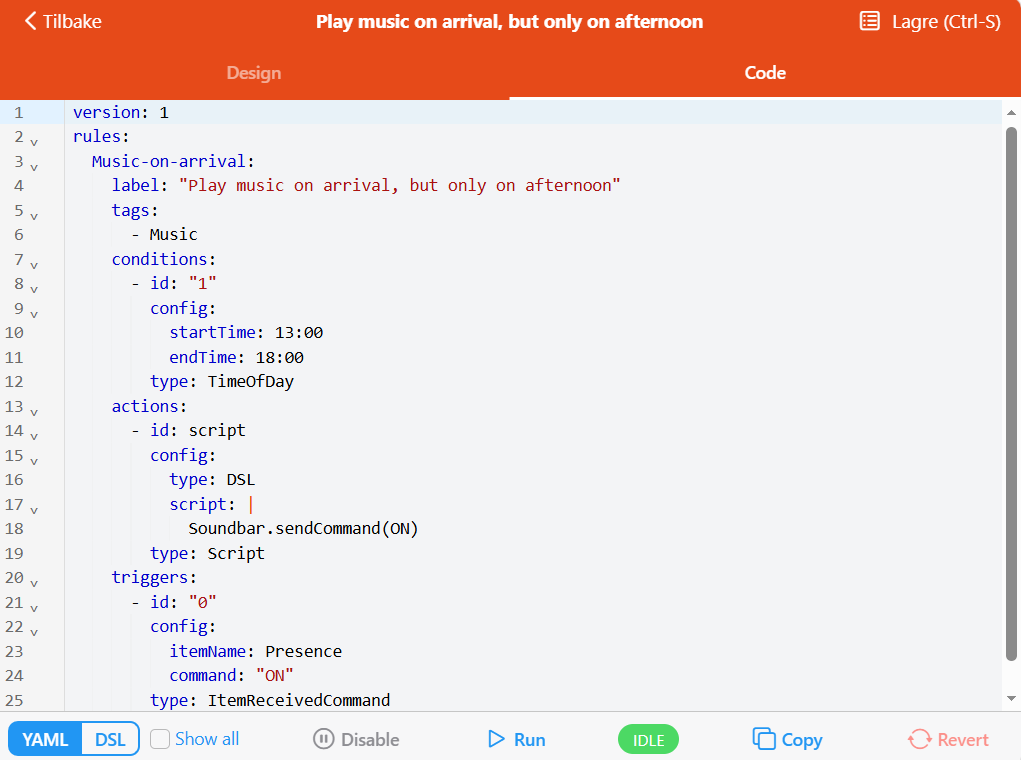
In Main UI the Code tab for the rules page has been changed to work similarly to those for Things and Items — it now contains file‑compatible syntax for both YAML and DSL formats.
However, not all rules can be expressed in all formats. This is evaluated on a per-rule basis, and only the applicable formats are shown. If a rule cannot be expressed in either YAML or DSL, the Code tab will be hidden.
Rules can also be copied to the clipboard in either YAML or DSL format both from the rules page itself, or from the rules overview page. Using the rules overview page, it is possible to copy the definitions of multiple rules at once, but only for rules that can be expressed in the target format.
Rule templates don't have Main UI editing support, so there's no visible change for them, but they can still be exported to YAML by using the /file-format/ruletemplates endpoint in the REST API, for example using the API Explorer.
The community marketplace already supports the new YAML format for rule templates, as well as block libraries.
# YAML/DSL File Formats for Sitemap UI
Laurent Garnier (@lolodomo (opens new window)), openHAB Maintainer
In this release, file-based YAML support has been introduced for sitemap UI. This format offers an alternative to the existing DSL format. Conversion between formats is also available through enhanced REST APIs.
Additionally, it is now possible to define multiple sitemaps in a single YAML or .sitemaps file.
Many thanks to Mark Herwege (@mherwege (opens new window)) for contributing this feature!
# Powerful Upgrades to Rules DSL
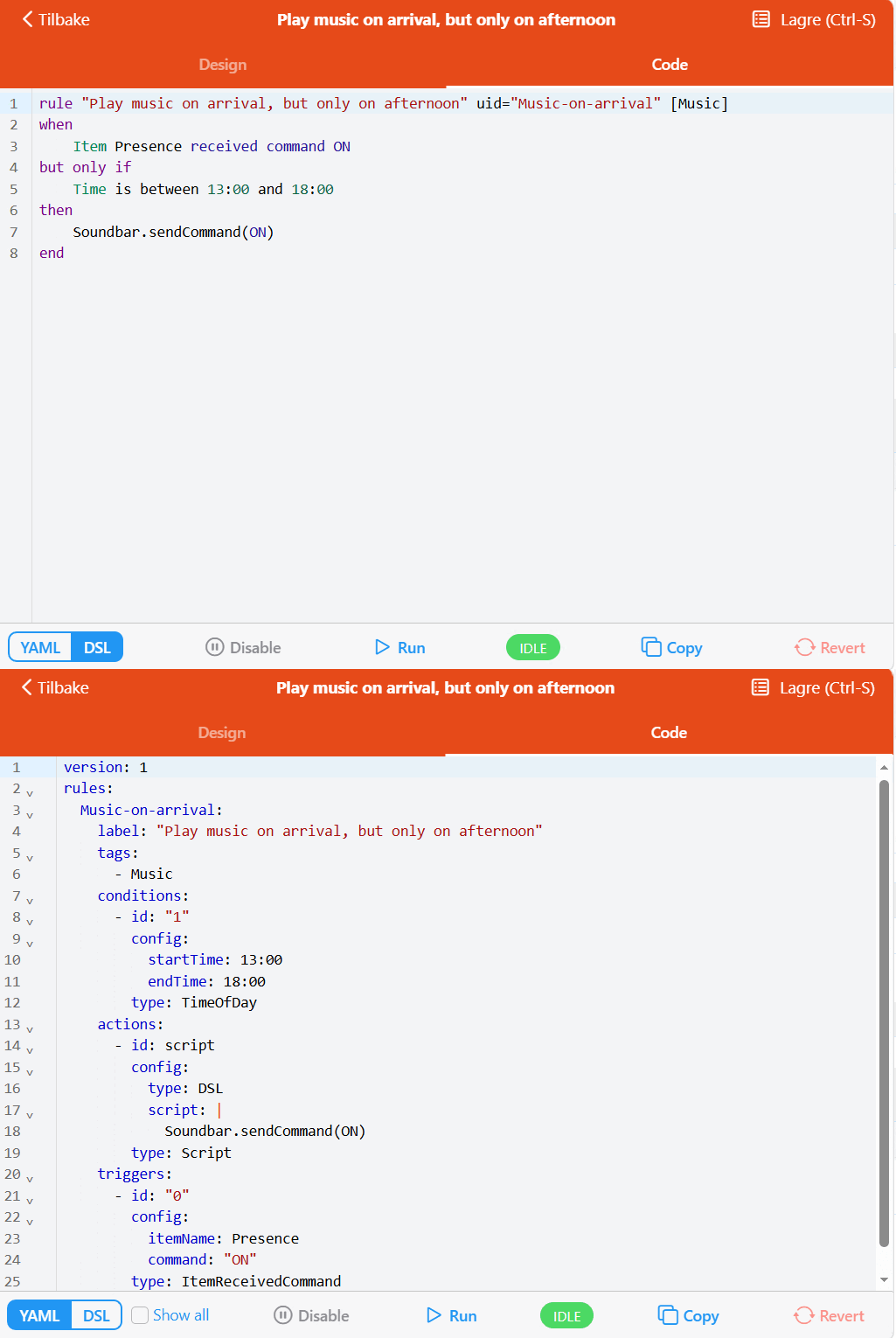
Rules DSL has been a core part of openHAB since its initial release many years ago. In openHAB 5.2, this text-based rule engine receives a major update designed to improve flexibility, modularity, and feature parity with standard rules.
Whether you write rules manually in text files or manage them via the Main UI, this release removes several historical limitations and introduces new ways to structure your Rules DSL-based automation:
- Native Conditions:
openHAB 5.2 adds support for native condition blocks, similar to those in the Main UI. You can now cleanly separate conditions from actions, removing the need to clutter the action withifconditions and guard clauses. - Triggerless Rules:
You can now define a DSL rule without triggers, which is perfect for creating reusable scripts meant to be executed manually or called exclusively by other rules. - Convenience Functionality:
The standard library has been extended with a number of new functions, allowing for more concise and readable code. Refer to Rules DSL: Convenience Functionality for more details. - Inter-Rule Execution:
Rules DSL now supports invoking and executing another rule from within a rule. This allows writing more modular and maintainable automation — even across different languages. - Set ID & Tags:
You can now assign an ID and tags to a DSL rule, allowing for easier identification and organization. - Main UI Code Tab:
Main UI now displays the source code for DSL rules.
Here is an example of a rule with UID, tag, and condition:
rule "Play music on arrival, but only in the afternoon" uid = "Music-on-arrival" [ Music ]
when
    Item Presence received command ON
but only if
    Time is between 13:00 and 18:00
then
    Soundbar.sendCommand(ON)
end
Many thanks to Laurent Garnier (@lolodomo (opens new window)) for contributing a major part of these updates!
# Protect your Secrets with Environment Variables
Florian Hotze (@florian-h05 (opens new window)), openHAB Maintainer
Now that our new MCP integration makes it easier than ever to work on your openHAB configuration with AI agents, you might be wondering:
How do I protect my secrets? How can I prevent an AI agent from accessing credentials and API keys?
To solve this issue, we've added support for referencing environment variables in Thing configuration.
Using the new ${ENV:MY_API_KEY} syntax, you can pass the value of the MY_API_KEY environment variable to a Thing's configuration property.
This feature also comes in handy when tracking your openHAB configuration with Git — keeping secrets out of Git history is a common best practice.
# Main UI Enhancements
Building on the incredible momentum from openHAB 5.1 and the major Vue 3 & Framework7 upgrade, we've put a lot of work into refactoring major parts of our codebase from JavaScript to TypeScript. Making these "under the hood" changes allowed us to improve our overall code quality and stability, while also enabling us to ship new features more easily.
# Access Logs across the UI
Jimmy Tanagra (@jimtng (opens new window)), openHAB Maintainer
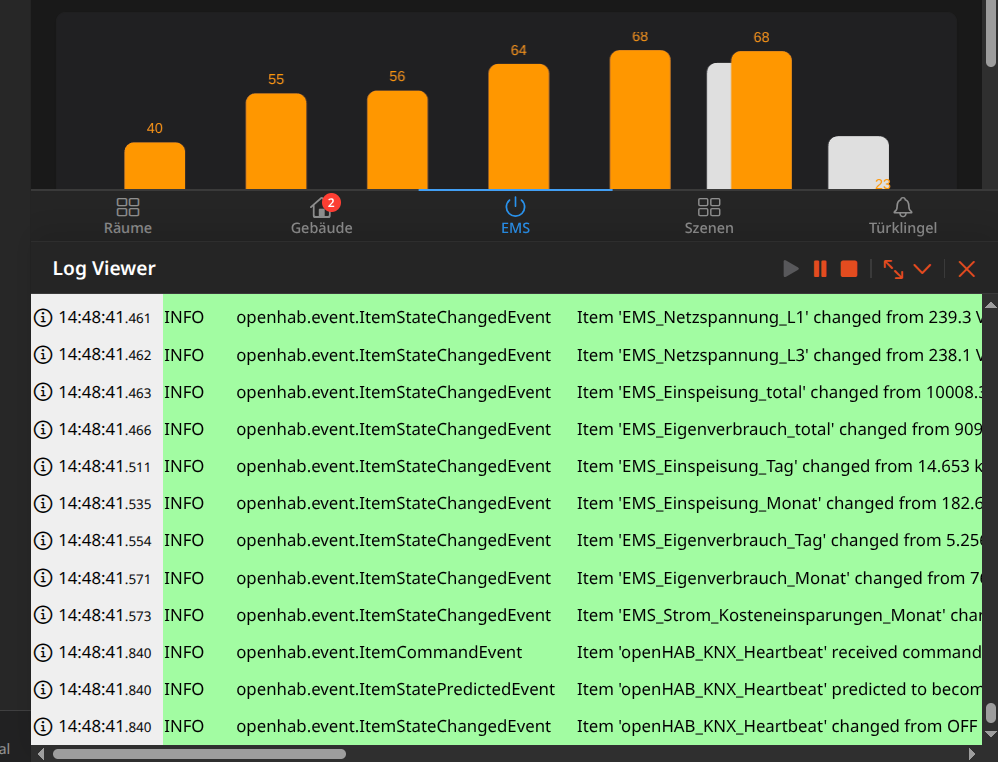
Debugging your rules, monitoring item changes, and tracking system events just got a whole lot smoother. You no longer have to constantly switch back and forth to the dedicated Developer Log Viewer page.
Thanks to a new embedded Log Viewer Pane, administrators can now toggle a persistent log console directly at the bottom of Main UI. It overlays seamlessly across different pages, allowing you to watch your system's behavior in real time while actively configuring your Things, Items, or Rules.
Key Highlights:
- Global & Persistent:
Once opened, the pane stays visible and maintains your active log stream even as you navigate between different administration pages. - Easy Toggles:
The pane can be opened or closed instantly by clicking the log iconlocated in the top-right corner of the screen. - Fully Resizable Workspace:
You can easily adjust the pane's height by dragging the top handle, and individual column widths can be customized by dragging the borders between them. Double-clicking a column resize handle automatically snaps it to the width of its longest content, and a reset button lets you instantly revert to the default width. Your preferred dimensions are automatically saved to your browser's local storage. - Message Wrapping & Text Controls:
A new toggle allows you to enable or disable line wrapping for log messages. To prevent accidental clicks while highlighting or copying text, only the Time column will trigger the log detail popup. - Keyboard Shortcuts:
For power users, you can quickly control the pane without touching your mouse:- Shift + Alt + L: Toggle the visibility of the Log Pane.
- Shift + Alt + F: Maximize the pane to fullscreen (automatically collapses back down on page navigation so you don't lose your spot).
- Maximize Workspace:
The pane features a collapsible filter and toolbar header, letting you hide the controls entirely when you want to maximize the vertical screen space dedicated to your logs.
# Charting Made More Powerful
Florian Hotze (@florian-h05 (opens new window)), openHAB Maintainer
Main UI has included a charting engine since its initial release with openHAB 3.0, and with openHAB 5.2, charts receive their biggest upgrade yet. After refactoring all charting code to type-safe TypeScript code, we've addressed a ton of long-standing feature requests:
- Display State Support:
A new series parameter has been added to format chart values according to the Item's state description. For UoM-enabled Items, this will display the chart data in the Item's display unit, and not the "system" unit. - More Sophisticated Tooltips:
Chart tooltips have been improved to display the unit of measurement or mapped Item states if defined through state descriptions. - Extended UI Support for Configuration:
It has always been possible to customize charts by providing ECharts options through the code tab. openHAB 5.2 finally adds UI support for configuring the most common series options, including:- color
- series label position (for line/bar charts)
- border radius (for bar charts)
- x-axis style (label only, label & line, label & line & axis ticks)
- y-axis style (axis line, minor lines, and areas can be individually enabled or disabled)
- Initial Period for Fixed Period Charts:
The initial period for fixed-period charts can now be set. - Fixed Chart Periods over 1 Year:
Fixed chart periods of 2, 3, and 5 years have been added, extending the chart range. - New Yearly Aggregation:
A new yearly aggregation has been added, allowing you to compare several years in fixed-period charts.
# Enhanced Sitemap Management
Laurent Garnier (@lolodomo (opens new window)), openHAB Maintainer
Main UI now lists all available sitemaps in a new, dedicated Sitemaps page within the settings section, including those defined in configuration files (DSL and YAML formats). You can open the sitemap editor from any existing sitemap, which opens in read-only mode for sitemaps provided as configuration files. The Code tab now contains file‑compatible syntax for both YAML and DSL formats.
Sitemaps can also be copied to the clipboard in either YAML or DSL format either from the Sitemaps page itself, or from the Code tab in a particular Sitemap page. If you want to transition a sitemap from a configuration file to being UI-managed, the "Duplicate" button in the Design tab can be used to create a new, editable sitemap managed by Main UI from the sitemap defined in the configuration file.
Many thanks to Mark Herwege (@mherwege (opens new window)) for the development of this feature!
# Redesigned Persistence Configuration
Mark Herwege (@mherwege (opens new window)), openHAB Maintainer
Configuring persistence through Main UI has been streamlined, making it easier to understand and configure:
The main entry point is now the configuration for a specific persistence service. From there, you can easily configure Items and aliases, allowing you to pick existing strategies and filters, or create new ones.
Strategies and filters are now considered second-level configuration and are available through a definitions popup. When working on cron strategies, the cron strategy editor now fully supports updating an existing cron expression.
In addition to this enhancement, we have improved health checks for persistence configurations, warning you about more inconsistencies or conflicts.
# Persistence Status on the Item page
Mark Herwege (@mherwege (opens new window)), openHAB Maintainer
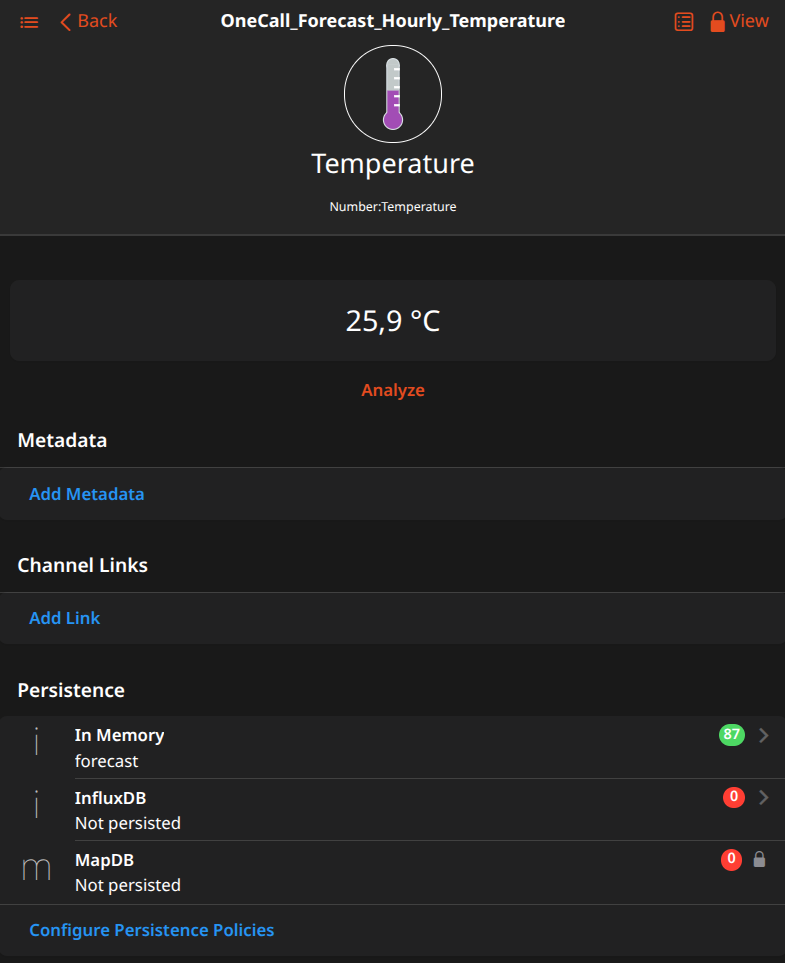
Have you ever wondered if a specific Item is being persisted, which service is in play, or what the persistence rules are?
Until now, you had to build a mental model by looking at your persistence configuration and interpreting all rules to find out. It was not always easy to understand what happens. openHAB 5.2 does all of that for you and makes it visible on the Item page in the UI.
# Setup Wizard Improvements
Mark Herwege (@mherwege (opens new window)), openHAB Maintainer
The setup wizard is the first thing a user sees when setting up a new system. This release improves that experience in a number of ways:
- New configuration steps have been added — finally including persistence — improving the coverage of the initial wizard configuration.
- A brief overview of openHAB concepts has been added in the context of an initial configuration (which can be skipped).
- A breadcrumb display and buttons to navigate back and forth through the wizard or jump to specific steps have been added.
- The wizard now keeps track of the steps that have been completed and persists that state across sessions.
- A link to the Help & About page has been added to open the wizard again after the initial setup. The wizard will always preserve any existing configuration, with changes only adding to it.
# Voice Support
Besides the new Chat interface, openHAB 5.2 also bridges the gap between text-based chat and physical voice assistants by introducing a way to talk to openHAB's voice system right from the user interface.
Instead of being restricted to typing, you can now initiate a real-time voice dialogue directly inside Main UI. This turns any browser-equipped device—like a wall-mounted tablet, a laptop, or a smartphone—into an interactive voice satellite. Simply enable voice dialog support in the Help & About page, tap the microphone icon in the top navigation bar, and openHAB will listen, process your intent, and respond to you natively using your preferred speech-to-text and text-to-speech engines.
This new feature is based on a WebSocket-based API that allows streaming voice commands to openHAB and receiving audio responses. We are planning to add more voice capabilities in the future — stay tuned!
Kudos to Miguel Álvarez Díez (@GiviMAD (opens new window)) for implementing this new feature!
# Add-on Enhancements
openHAB 5.2 ships with 19 new add-ons, marking a significant milestone by surpassing 500 add-ons:
- Atmo France Binding: Integrates air quality data from Atmo France (opens new window), the French national federation of air quality monitoring associations.
- Bluelink Binding: Provides vehicle telemetry and control for Hyundai, Kia, and Genesis vehicles through the Bluelink service.
- Dahua Door Binding: Integrates Dahua VTO door stations with support for real-time events, door lock control, image capture, and WebRTC/SIP-based two-way audio/video intercom calls.
- DD-WRT Binding: Monitors and manages routers and access points running DD-WRT, OpenWrt, Tomato, or generic Linux via SSH.
- Energy Forecast Binding: Integrates with the energyforecast.de (opens new window) service to retrieve AI-based electricity generation and consumption forecasts.
- Geocoding Transformation: Converts geo coordinates into human-readable addresses and vice versa.
- Google Gemini Binding: Integrates Google's Gemini Large Language Models to enable natural language control, see above.
- Home Connect Direct Binding: Connects Home Connect appliances locally over the LAN without cloud dependencies, see below.
- LinkPlay Binding: Integrates Wi-Fi audio devices based on the LinkPlay platform, enabling music playback and multiroom group control.
- Math Transformation: Evaluates mathematical expressions to transform states and values dynamically.
- Model Context Protocol (MCP) Integration: Exposes openHAB's items, rules, semantic model, and configuration to local or cloud-based AI agents, see above.
- ntfy Binding: Integrates with the open-source, self-hostable ntfy.sh (opens new window) service to send custom push notifications to mobile devices.
- Pirate Weather Binding: Retrieves weather observations and forecasts from the Pirate Weather API (opens new window).
- Remeha Heating Binding: Integrates Remeha Home heating systems, enabling cloud-based monitoring and control of boilers and hot water settings.
- TimescaleDB Persistence Service: A dedicated persistence service that utilizes the time-series features of TimescaleDB (PostgreSQL) for improved performance and efficiency.
- Twilio Binding: Connects with the Twilio cloud communications platform to send/receive SMS, WhatsApp messages, and make voice calls with text-to-speech.
- UniFi Access Binding: Connects to Ubiquiti UniFi Access controllers to monitor door events and control locks.
- Worx Landroid Binding: Connects Worx Landroid robotic lawn mowers to openHAB.
- YAML Composer: Enables modularity for YAML configuration files, see below.
Beyond new additions, several existing bindings received massive improvements:
- Matter Binding: Received significant upgrades, including support for over-the-air firmware updates via openHAB, expanded device support (smoke, CO, CO₂ sensors, and EU style deadbolts), a new Thread network map visualization, and reduced startup connection times, see below.
- Ring Binding: Added support for Ring Intercom 'open door' functionality, status and control of light and siren on supported devices, camera snapshot support, and the ability to toggle motion detection on/off.
- Roborock Binding: Introduced local protocol support, Roborock map rendering, routines as channel options, and support for Roborock Q7 and Q10 vacuums.
- Roku Binding: Refactored discovery to use UPnP, improved TV status polling and refresh job timing, and improved offline handling.
- Shelly Binding: Added support for Shelly BLU Zigbee devices (Motion, H&T Display, Door/Window, Remote), new Gen3 and Gen4 devices (Plug M Gen3, Pro Dimmer 2PM, Plug US Gen4, Plus Plug CPM Gen4), and implemented WebSockets keep-alive for Gen2+ devices.
- Tesla Binding: Added a new "share" channel for setting navigation destinations directly from rules/scripts, added representation properties, and improved offline status messages.
- Tuya Binding: Added support for configurable TCP ports, better handling of battery devices, a new bitmap data type, immediate discovery after cloud login, and improved protocol 3.1 decryption detection.
# Matter Improvements
Dan Cunningham (@digitaldan (opens new window)), openHAB Maintainer
The Matter binding has improved substantially since our last release in capability, performance, and reliability.
# Over-the-air firmware updates
Matter devices can now be updated directly from openHAB, without the need for a separate manufacturer app. openHAB itself acts as a Matter OTA Provider. It looks up certified firmware in the CSA Distributed Compliance Ledger, the official blockchain registry where manufacturers publish updates, then downloads and serves the image to your device. Matter updates use the standard openHAB Core firmware framework, so they show up in Main UI just like they do for any other binding.
# Expanded device support
Support was added for smoke, CO, and CO₂ sensors, along with EU-style deadbolt locks. Air quality coverage is now complete, with all 11 concentration measurements supported: CO₂, CO, formaldehyde, NO₂, ozone, PM1, PM2.5, PM10, radon, and TVOC.
# A new Thread network map
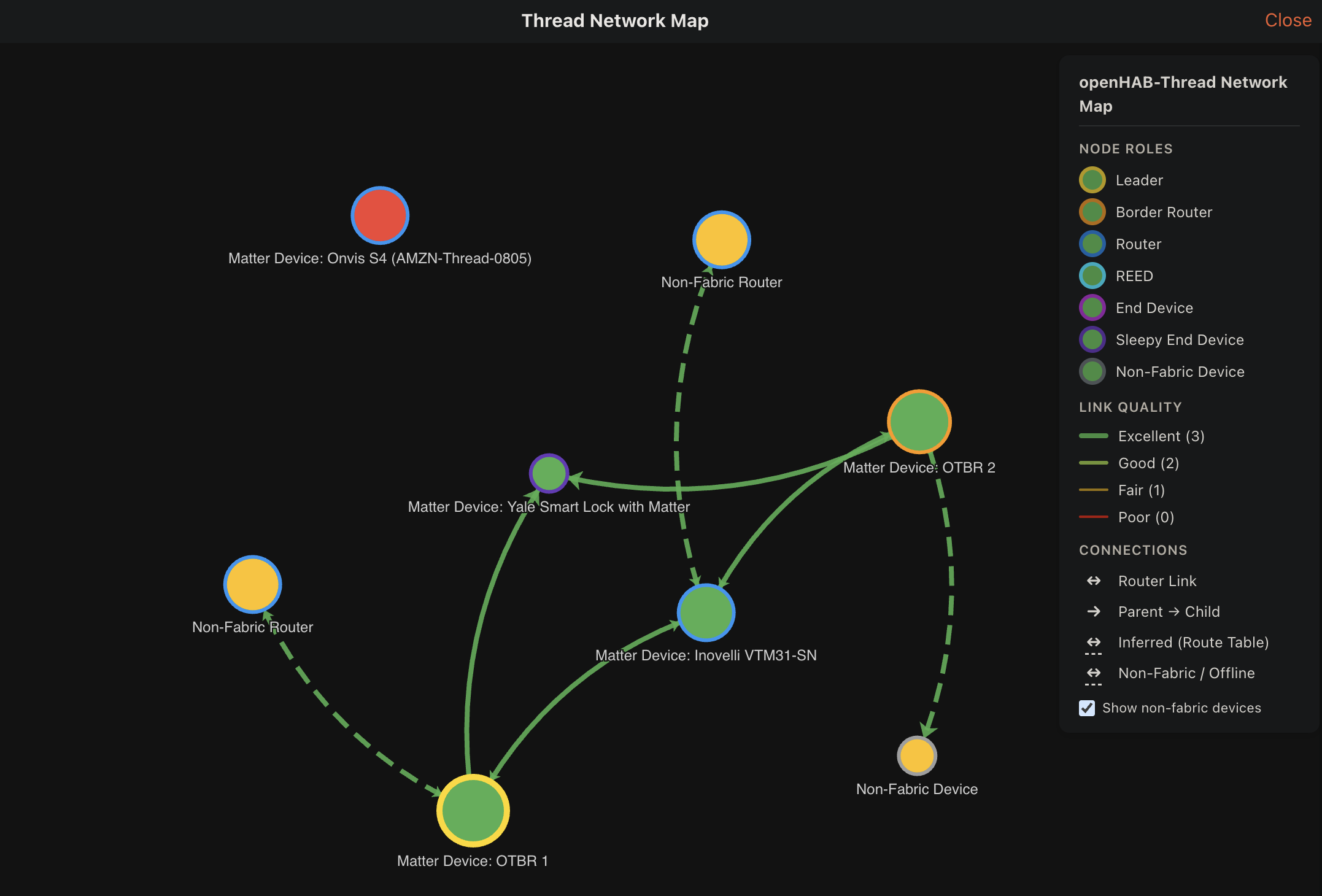
Main UI now includes a visualization of your Matter and Thread network, much like the existing Z-Wave network view. It can also handle setups with multiple Thread Border Routers from different vendors, as well as display link quality, mesh roles, and more.
# Thread device improvements
Many changes to both the binding itself and the Matter library it depends on have greatly reduced Thread connection times during system startup and when reconnecting to Thread devices. Commissioning of new Thread devices is now more reliable, and several Thread-specific crashes and regressions have been resolved.
# YAML Composer: Bring Modularity to Your Configurations
Jimmy Tanagra (@jimtng (opens new window)), openHAB Maintainer
As openHAB setups grow, managing massive, repetitive YAML files can quickly become a maintenance headache. The newly introduced YAML Composer Add-on completely shifts the paradigm by introducing a powerful, feature-rich preprocessing engine for your YAML configurations. Power users familiar with ESPHome will feel right at home, as this system draws heavy inspiration from its modular, package-based configuration architecture.
Instead of dealing with sprawling, repetitive code blocks, YAML Composer lets you build your configuration using modular, reusable building blocks.
The add-on monitors "enhanced-syntax" YAML files located in $OPENHAB_CONF/yamlcomposer/ and automatically compiles them into fully resolved, plain YAML files under $OPENHAB_CONF/yaml/composed/ for openHAB to natively consume.
Here are the key features that make this a game-changer for advanced power users:
- Variables:
Define reusable key-value pairs within configuration blocks to centralize constants (like IP addresses or structural settings). - Rich Expressions & Interpolation:
Utilize Jinjava-backed string interpolation (${...}) alongside custom filters likedig(for safe nested map/list data retrieval),capitalize,upper,lower,label, etc. - Modular Files (
!include):
Break down massive files into smaller, modular, reusable, and highly maintainable snippets with per-invocation variable definitions. - Dynamic Templates (
!insert):
Define inline templates once and expand them dynamically with per-invocation variable overrides. - Packages:
Bundle and merge modular "packages" of related configurations (Things, Items, etc.) into your main model. - Conditional Branching (
!if):
Inject structural conditional logic directly into your configuration trees based on your defined variables. - Support for YAML's anchors/aliases and merge keys.
Quick Example: Dynamic Package Instantiation
To showcase the true power of the system, you don't need to manually pass repetitive variables to duplicate configuration blocks.
YAML Composer treats the packages mapping keys natively as a unique package_id.
From that single key, you can automatically derive clean item names, human-readable labels, and MQTT topics using built-in string transformation filters, while still retaining the ability to inject per-instance overrides.
First, define your reusable package component containing a Thing and its related Items:
# Reusable Package: $OPENHAB_CONF/yamlcomposer/packages/smart_plug.inc.yaml
variables:
  titlecase: ${package_id | replace("-", " ") | title}
  name: ${titlecase | replace(" ", "_")}
  label: ${titlecase}

things:
  mqtt:topic:${package_id}:
    bridge: ${broker}
    channels:
      power:
        type: switch
        config:
          stateTopic: ${package_id}/state
          commandTopic: ${package_id}/set/state
      # ... other channels (uptime, energy consumption, etc.)

items:
  ${name}_Power:
    type: Switch
    label: ${label} Power
    channel: mqtt:topic:${package_id}:power
  # ... more items for the smart plug, e.g. uptime, energy, etc.
Now, instead of writing endless lines of boilerplate, you can instantiate this package multiple times in your main file.
Notice how we cleanly share a global broker variable across instances and override the label for the bedroom heater on the fly:
# Input file: $OPENHAB_CONF/yamlcomposer/main.yaml
version: 1

variables:
  broker: mqtt:broker:main

packages:
  livingroom-lamp: !include packages/smart_plug.inc.yaml
  kitchen-coffee: !include packages/smart_plug.inc.yaml
  bedroom-heater: !include
    file: packages/smart_plug.inc.yaml
    vars:
      label: Bedroom Heated Blanket # Custom override
  # and many more as needed!
The background watch service instantly processes the file structure and generates a completely expanded, native YAML configuration for openHAB to seamlessly load:
# Generated output: $OPENHAB_CONF/yaml/composed/main.yaml
version: 1

things:
  mqtt:topic:livingroom-lamp:
    bridge: mqtt:broker:main
    channels:
      power:
        type: switch
        config:
          stateTopic: livingroom-lamp/state
          commandTopic: livingroom-lamp/set/state

  mqtt:topic:kitchen-coffee:
    bridge: mqtt:broker:main
    channels:
      power:
        type: switch
        config:
          stateTopic: kitchen-coffee/state
          commandTopic: kitchen-coffee/set/state

  mqtt:topic:bedroom-heater:
    bridge: mqtt:broker:main
    channels:
      power:
        type: switch
        config:
          stateTopic: bedroom-heater/state
          commandTopic: bedroom-heater/set/state

items:
  Livingroom_Lamp_Power:
    type: Switch
    label: Livingroom Lamp Power
    channel: mqtt:topic:livingroom-lamp:power

  Kitchen_Coffee_Power:
    type: Switch
    label: Kitchen Coffee Power
    channel: mqtt:topic:kitchen-coffee:power

  Bedroom_Heater_Power:
    type: Switch
    label: Bedroom Heated Blanket Power
    channel: mqtt:topic:bedroom-heater:power
# Home Connect Direct Binding
Jonas Brüstel (@bruestel (opens new window)), openHAB Contributor
In this release, the new Home Connect Direct Binding integrates Home Connect (opens new window) enabled appliances into openHAB over your local network. It works with the many brands built on the Home Connect platform, including Bosch, Siemens, Gaggenau, NEFF, and more. Unlike the existing Home Connect binding, this implementation talks directly to your appliances on the LAN. There is no cloud account and no internet connection involved during operation, which results in reliable, low-latency control and ensures it keeps working even when the manufacturer's cloud is unavailable.
A broad range of appliance types is supported, including dishwashers, washers, dryers, washer/dryer combinations, ovens, warming drawers, coffee makers, cook processors (Cookit), hoods, cooktops, and fridge/freezers. Appliances are found automatically on your network via mDNS and show up in the Inbox, so adding them is as simple as accepting the discovery result.
# Rich channel support
Each appliance type comes with a set of preconfigured channels for common functions such as power state, door contact, operation state, remaining program time, program progress, and program control. Many channels are added dynamically based on the exact features your appliance model reports, for example the different oven cavities, i-Dos dosing on washers, or the individual cooling compartments of a fridge/freezer. Beyond that, custom channels let you expose any internal value or capability from the appliance profile, so even functions that are not covered by the standard channels remain accessible.
# A console for setup and diagnostics
The binding ships with its own built-in web console. It lists all your appliances with their connection status and hardware details, and provides a real-time monitoring view of every message exchanged between openHAB and an appliance. A handy openHAB configuration generator produces ready-to-use YAML or DSL snippets for custom channels directly from the values you see in the live message stream.
# UniFi Family of Add-ons
Dan Cunningham (@digitaldan (opens new window)), openHAB Maintainer
Support for Ubiquiti hardware in openHAB previously required two separate bindings, UniFi Network and UniFi Protect, each installed independently with its own bridge and its own copy of your console credentials.
This release consolidates these into a single UniFi binding and adds UniFi Access support. The UniFi add-on now covers all three product families: UniFi Network clients and WLANs, UniFi Protect cameras and sensors, and UniFi Access doors, locks and readers.
The combined binding allows each UniFi Thing to share a single unifi:controller bridge.
Rather than configuring your host, username, and password separately for each product family, you set up the console once.
The controller authenticates a single time and shares that session, preventing duplicate logins and lockouts, and removing the complexity of supporting multiple authentication implementations going forward.
Upgrading is easy:
Your existing Things, Channels, and Items will continue to work.
For existing UniFi Protect users, all that is required is to point your Protect Things at a unifi:controller Bridge.
Use an existing controller Bridge or create a new one, then use the Main UI to select it as the parent Bridge for your existing UniFi Protect Things.
# New: UniFi Access
This release introduces first class support for UniFi Access, Ubiquiti's door access platform (opens new window), streaming real-time door events as they happen. Capabilities include:
- Lock control and monitoring:
Lock and unlock doors, read position sensors, track who last unlocked a door, and apply lock rules such as keep-unlocked, keep-locked, or timed unlock. - Access events:
Real-time notifications of successful entries, denied attempts, and remote unlocks, including who authenticated and by which method (NFC, PIN, face, mobile, and more). - Doorbell and intercom:
Monitor the entire door lifecycle, from button press through answered, timed out, or completed. - Reader configuration and security signals:
Reader access methods, forced-door alarms, and system-wide emergency modes such as lockdown and evacuation.
# JavaScript & Python Debugger Support
Florian Hotze (@florian-h05 (opens new window)), openHAB Maintainer
Writing complex automation rules just got a massive upgrade. In openHAB 5.2, we are thrilled to introduce full debugger support for both the popular JavaScript (GraalVM) and Python Scripting add-ons!
If you've ever found yourself debugging a complex rule by scattering console.log() or self.logger statements throughout your code, this feature is for you.
The new debugging feature supports the Chrome DevTools protocol, making it incredibly easy to connect your favorite development tools — such as Visual Studio Code. To use it, enable it in the JavaScript or Python Scripting add-on configuration and add a debugger configuration to your development environment. Please note that the debugger currently only supports file-based scripts.
Refer to the JavaScript documentation for setup instructions.
# Enjoy and Get in Touch
We are excited to see what you will do with the new features and improvements in openHAB 5.2 — your feedback is always welcome! As always, our community forum (opens new window) is there for questions, comments, and discussions. Do not hesitate to get in touch, join our community, receive help, and share your experiences and use cases.